 珂珂的个人博客 - 一个程序猿的个人网站
最近发现被限速,http ssh 上传到阿里云正常,但iperf3 tcp 到阿里云速度只有3mbps
| 延迟ms | 抖动ms | 下载mbps | 上传mbps | |
| surface外面连接车机中科大测速 | 86 | 19 | 51 | 6.3 |
| surface外面手机卡中科大测速 | 46 | 5 | 25 | 44 |
| surface外面手机卡openvpn连家里网站测速 | 25.9 | 6 | 3 | 32 |
| surface外面手机卡值连家里网站测速 | 27.1 | 3 | 6 | 46.8 |
| 手机连接车机中科大测速 | 89/91.8 | 7.61/7.33 | 35.8/24.4 | 115/86.8 |
| 手机流量直连家里测试网站 | 15.2 | 9.2 | 59.8 | 99.7 |
| 手机流量openvpn连家里测速网站 | 13.1 | 12.9 | 2.78 | 49.2 |
| 手机流量tailscale连家里测速网站 | 25.8 | 7.5 | 1.9 | 3.32 |
| 手机连车机 tailscale连家里测速网站 | 112 | 11.1 | 1.78 | 3.8 |
| 家里宽带连接阿里云部署的测速网站 | 7.9 | 2.5 | 3.16(受限阿里云出口带宽) | 68.4 |
3.24 surface手机网络frp威联通p2p成功,通过ipv6浏览器直接访问qfile 下载能满速,但是穿透后的127.0.0.1 被限速3mbps
访问穿透后的ubuntu 测速网站也被限速。
3.26
阿里云临时升级10M 带宽,surface 手机重庆电信卡连headscale 连家里ubuntu 仍然被卡下载3Mbps 以下,上传10mbps
访问威联通网页上浏览器下载文件也卡3mpbs
WireGuard 连接威联通浏览器下载文件也卡3mbps 网页测速2.02 3.72
frpc p2p也卡3mpbs
2026.3.7
openwrt
opkg update失败
发现有些清华源貌似没权限访问了
可以换下源
查看版本
cat /etc/openwrt_release
DISTRIB_RELEASE='...' (这是正确的版本号,例如 23.05)
修改文件/etc/opkg/distfeeds.conf 最好先备份下
src/gz openwrt_core https://mirrors.ustc.edu.cn/openwrt/releases/24.10.5/targets/x86/64/packages
src/gz openwrt_base https://mirrors.ustc.edu.cn/openwrt/releases/24.10.5/packages/x86_64/base
src/gz openwrt_routing https://mirrors.ustc.edu.cn/openwrt/releases/24.10.5/packages/x86_64/routing
src/gz openwrt_telephony https://mirrors.ustc.edu.cn/openwrt/releases/24.10.5/packages/x86_64/telephony
src/gz openwrt_packages https://mirrors.ustc.edu.cn/openwrt/releases/24.10.5/packages/x86_64/packages
部分openwrt ssh连接后没有文件,是因为没有启用sftp
先安装软件,可能某些固件会缺少模块?
opkg install vsftpd openssh-sftp-server
设置系统开启后自动启动 sftp 服务
/etc/init.d/vsftpd enable
启动 sftp 服务
/etc/init.d/vsftpd start
安装FakeHttp
opkg update
opkg install nftables kmod-nft-queue
部分固件这一步就卡住了,最后找的这个固件倒没报错,但最后还是运行不起来fakehttp
FakeHTTP
curl -L https://gh.xrgzs.top/https://github.com/MikeWang000000/FakeSIP/releases/latest/download/fakesip-linux-x86_64.tar.gz -o fakesip.tar.gz
tar xzvf fakesip.tar.gz
chmod +x ./fakesip-linux-x86_64/fakesip
./fakesip-linux-x86_64/fakesip
FakeSIP
curl -L https://gh.xrgzs.top/https://github.com/MikeWang000000/FakeSIP/releases/latest/download/fakesip-linux-x86_64.tar.gz -o fakesip.tar.gz
tar xzvf fakesip.tar.gz
chmod +x ./fakesip-linux-x86_64/fakesip
./fakesip-linux-x86_64/fakesip
但是我运行fakehttp报错
root@LsymOS:~# ./fakehttp-linux-x86_64/fakehttp -h kecq.com -i eth0
2026-03-07 09:20:15 [src/mainfun.c:382] FakeHTTP version 0.9.18
2026-03-07 09:20:15 [src/mainfun.c:383]
2026-03-07 09:20:15 [src/mainfun.c:384] FakeHTTP is free software licensed under the GPLv3.
2026-03-07 09:20:15 [src/mainfun.c:385] Distribution without the accompanying source code is not permitted.
2026-03-07 09:20:15 [src/mainfun.c:386]
2026-03-07 09:20:15 [src/mainfun.c:387] Home page: https://github.com/MikeWang000000/FakeHTTP
2026-03-07 09:20:15 [src/mainfun.c:388]
2026-03-07 09:20:15 [src/nfqueue.c:158] ERROR: nfq_create_queue(): Invalid argument (Missing kernel module?)
2026-03-07 09:20:15 [src/mainfun.c:410]     at fh_nfq_setup()
2026-03-07 09:20:15 [src/mainfun.c:410]     at main()
fakehttp命令
Usage: fakehttp [options]
接口选项(Interface Options):
-a 作用于所有网络接口(忽略 -i)
-i <interface> 作用于指定的网络接口
负载选项(Payload Options):
-b <file> 使用二进制文件作为 TCP 负载
-e <hostname> 用于 HTTPS 混淆的主机名
-h <hostname> 用于 HTTP 混淆的主机名
通用选项(General Options):
-0 处理入站连接
-1 处理出站连接
-4 处理 IPv4 连接
-6 处理 IPv6 连接
-d 以守护进程方式运行
-k 杀掉正在运行的进程
-s 启用静默模式
-w <file> 将日志写入 <file>,而不是标准错误输出
高级选项(Advanced Options):
-f 跳过防火墙规则
-g 禁用跃点数估算
-m <mark> 用于绕过队列的 fwmark
-n <number> Netfilter 队列编号
-r <repeat> 重复生成的数据包 <repeat> 次
-t <ttl> 生成数据包的 TTL
-x <mask> 设置 fwmark 的掩码
-y <pct> 将 TTL 动态提升至估算跃点数的 <pct>%
-z 使用 iptables 命令而不是 nft
接下来找到你上网的网络接口(WAN 口)。我这边是旁路由因此是 eth0,以实际的为准。
./fakehttp-linux-x86_64/fakehttp -h kecq.com -i eth0
如果需要设置成开机启动,可以进入 luci http://192.168.1.1/cgi-bin/luci/admin/system/startup,在 本地启动脚本 中加入以下命令,在开机时使用 -d 参数运行即可,程序会在后台运行。
# Put your custom commands here that should be executed once
# the system init finished. By default this file does nothing.
/root/fakehttp-linux-x86_64/fakehttp -h kecq.com -i eth0 -d
# /root/fakesip-linux-x86_64/fakesip -i eth1 -t 4 -d
exit 0
如果要关闭后台运行,可以使用 -k 参数运行,会自动删除添加的防火墙规则。
/root/fakehttp-linux-x86_64/fakehttp -k
我这里openwrt没运行成功,在局域网的Ubuntu上倒是可以运行,但还是没能解除限速,后来尝试是因为kecq.com 明显没有在白名单
./fakehttp-linux-x86_64/fakehttp -d -e www.speedtest.cn -i ens18
测试正常,ps -ef|grep fakehttp 可以找到进程号再kiill -9 结束或者
./fakehttp-linux-x86_64/fakehttp -k 结束测速又慢下来
然后发现虽然 iperf3 -c kecq.com 速度正常了,但是无论ipv6 直连,openvpn ,tailscale 速度仍然受限。
ikuai
今天在用ikuai 4.0 做主路由的时候发现LAN 口 DNS默认是114.114.114.114 和223.5.5.5 貌似还不能留空,设为自己貌似有问题? 并且做主路由后,局域网设备将网关改为ikuai地址 192.168.31.3
dns也改为ikuai 地址192.168.31.3 发现上不了网,必须设置一个公共dns 223.5.5.5 才可以。
2026.3.22
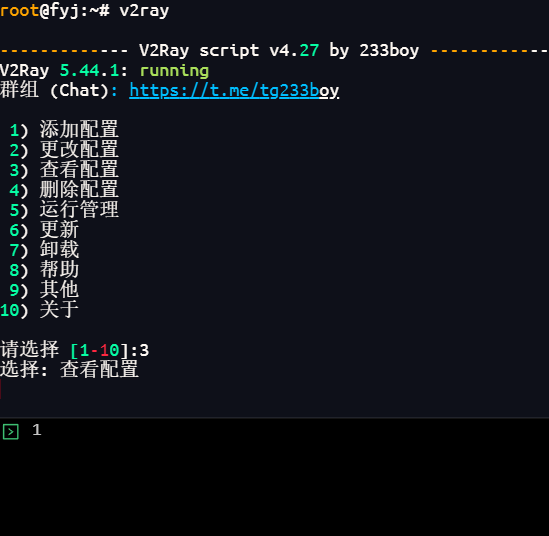
今天试下v2ray
前面在家里ubuntu上安装了233boy的,但是查看不知为啥看不了

试下
V2ray+X-UI
使用脚本一键安装
bash <(curl -Ls https://raw.githubusercontent.com/vaxilu/x-ui/master/install.sh)
安装过程中输入用户名密码端口号
ufw 放行这个端口tcp
安装完成后访问http://your_server_ip:面板端口
默认好像是12306 端口,可以输入 x-ui 查看
点击昨天的入站列表添加入站
备注随便填写一个名字,其他保持默认就可以,传输那里试过ws 和grpc 可以不受运营商限速?
注意防火墙需要放行这个端口tcp
ufw 防火墙不知需不需要设置
大概是下面4句不知哪个生效,也可能都不用
ufw route allow in on enp6s18 out on tun0
ufw route allow in on tun0 out on enp6s18
ufw allow in on tun0
ufw allow in on enp6s18
如果用阿里云frps代理的话客户端frpc 直接用tcp 就可以代理ws 和grpc ?试过好像Ok
客户端使用
我这里使用v2rayN ,连上后使用全局模式访问ip138 可以看到ip地址是家里的
然后发现不能访问局域网192.168.x.x 还根据AI在服务器上搞了一些操作,貌似不需要的
sudo iptables -I FORWARD -d 192.168.31.0/24 -j ACCEPT
sudo iptables -I FORWARD -s 192.168.31.0/24 -j ACCEPT
客户端v2rayn 左下角可以看到有个socket 代理 socks:10808
可以用curl测试下
curl --socks5-hostname 127.0.0.1:10808 http://192.168.31.1
这里其实问题是系统代理服务器排除了192.168.x,去掉分号后的192.168.* 再次尝试访问网页192.168.31.1 能访问路由器地址,但好像cmd 是ping不通